Bypassing Root Detection in EvilCorp Mobile App (Without Runtime Tools)

I recently stumbled upon an interesting misconfiguration in the EvilCorp Bug Bounty Program. The Android application had Root/Jailbreak Detection enabled, and my goal was to bypass it without relying on runtime manipulation tools like Frida, Objection or MagiskHide.
Understanding Root Detection
Root detection is a common defence mechanism in mobile apps. It prevents rooted or jailbroken devices from accessing sensitive features. The logic is simple: a rooted device can bypass restrictions, manipulate data, and even exploit app logic. For financial apps especially, consistent enforcement of root detection is critical.
But EvilCorp’s implementation wasn’t consistent. That inconsistency opened the door for me to bypass root detection entirely and carry out normal user flows on a rooted device.
Initial Setup
Prepared a Genymotion emulator (rooted)
Installed the EvilCorp app
Launched the app → greeted with the usual “Root devices not supported!” warning screen
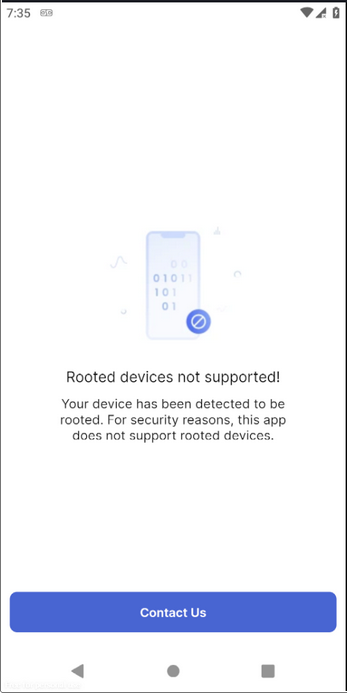
This was expected. Many apps either crash, block execution, or show a custom error message when root is detected.
So far, nothing unusual.
Digging Deeper
I grabbed the APK and decoded it with JADX-GUI. Searched for strings like root, root-detection, rooted. Read a bit of the logic, then went back to explore the UI.
That’s when I noticed a “Contact Us” button.
On a rooted device, Frida scripts weren’t helping, so I switched tactics. I installed the app on a normal phone just to see what was behind “Contact Us.” Instead of a form, it revealed a full list of support options.
At this point I had a hunch.
The Alternate Channel Trick
Here’s what I did:
Turned off my VPN connection.
Removed any proxy/VPN configuration from my PC.
Cleared the EvilCorp app’s cache/storage.
Reopened the app.
Surprisingly, the Contact Us page was now accessible, even on a rooted device. When I re-enabled VPN, it stopped working. Disabling it again → accessible.
Then I tried with a custom WiFi proxy and captured traffic successfully. Effectively, the root detection had been bypassed through this alternate channel.
Why Did This Work?
The root detection bypass happened because EvilCorp only enforced checks in certain parts of the app:
At startup/login, the app checked for root and blocked the user.
But in secondary flows (like Contact Us and Help pages), the check was skipped.
On top of that, the Contact Us activity behaved differently depending on VPN/proxy usage, suggesting the developers bundled VPN checks with root checks in the same logic. Disabling VPN caused the root check branch to fail, leaving the page accessible.
From there, the “Chat with Us” flow reused registration components that didn’t enforce root detection either.
This is a classic case of inconsistent security enforcement: a protection works in one place but is missing in another. Once a single alternate path exists, the entire defense is effectively broken.
Escalating the Test
Inside Help & Support, I found “Chat with us” → EvilCorp’s chatbot, EC Buddy.

I compared EC Buddy’s responses on:
A rooted device (logged out)
A normal device (logged in)
Key observation:
If logged out → EC Buddy only offered “Login” or “Back to Main Menu”

If logged in → EC Buddy exposed flows like KYC and Bank Account options.

But here’s the catch. Even while rooted and logged out, EC Buddy still gave me the “Create Account for Free” path.

So I clicked it.
Account Registration on a Rooted Device
The flow went like this:
Clicked “Create Account”
Landed on the registration page

Filled details → OTP sent

Successfully received OTP

Registered the account
At this point, I had a fully working registered account from a rooted device.
For completeness, I also:
Verified OTP flow
Reset the password (got OTP by mail + SMS)


Logged in with the new password
All steps worked on the rooted device.
The only limitation: once logged in, content pages showed “Check your connection” as the root detection is checked on the Main Activity. But the entire registration + password reset + login flow worked, something root detection was supposed to block.
Proof of Concept (POC)
Registered multiple accounts from rooted devices
Screen-recorded full flow
Showed OTP delivery (SMS + email)
Compared EC Buddy responses across rooted vs. non-rooted environments
Program Response
I submitted the findings with full POCs. The triager’s final response:
“As you can’t login, we don’t identify any real security impact.”
The report was closed as informational.
Lessons for Developers
This bug is a good reminder that:
Root detection must be consistent. Applying checks only at login or splash screen isn’t enough.
Alternate paths matter. Even “harmless” flows like Contact Us or ChatBot can indirectly lead to sensitive functionality.
Don’t bundle checks together. Root detection, VPN detection, and emulator detection should be handled independently. Otherwise, a bypass in one can weaken the others.
Reflections
Sometimes, bug bounty reports get misunderstood. The impact here was clear: EvilCorp’s root detection was inconsistently enforced, allowing critical flows like account registration and password reset from a rooted environment.
But as often happens in bug bounty:
Some triagers lack context
Some programs don’t value certain classes of issues
Sometimes it’s just bad luck
The program eventually moved platforms, but this experience highlights why root detection should be consistent across all app activities.
Timeline
Reported: 2024–06–19
Closed as Informational: 2024–08–01
About the author
Hi, I’m a Penetration Tester. My job is to intentionally make applications do things they’re not supposed to—finding flaws and exploiting them to ensure they’re secure. I specialize in Web, API, Android, and iOS security.
Comments
Join the discussionNo comments yet. Be the first to comment.